Developers rarely need access to a platform simply for the sake of having access. They need a clean way to do a specific job.
A fintech application may need predictable JSON and direct access to defined resources. A trader-facing assistant may need to answer a question in plain English using platform context. A developer working in Cursor or Claude may want an AI assistant to call approved platform tools without leaving the environment where they are already working.
Those are three different integration problems, even when they point to the same underlying trading platform.
The OHLCX Developer Hub includes a REST API, in-app AI agent interfaces, and a Model Context Protocol server, giving partners and enterprise teams different ways to work with the same broker-connected execution platform.
The right choice depends on what the integration needs to do.
Start with the workflow you are building
The technology should follow the interaction.
If an application already knows which resource it needs, what information it will send, and how it will use the response, a REST API gives the developer a direct path.
If the interaction begins with a human question rather than a predefined request, an AI agent can make more sense. The user does not need to know which endpoint contains the answer before asking.
MCP fits a different kind of workflow. It gives compatible AI assistants and development environments a standard way to discover and call platform tools without requiring a custom connector for every function.
A team may use one of those interfaces or combine them, depending on what it is building.
REST APIs fit structured application workflows
A trading API is useful when the software already knows what it wants to request or change.
A product may need to work with strategies, retrieve signals, query account information, access market data, or connect selected platform functions to an existing application. In those cases, the developer generally wants an explicit resource, a defined request, and a predictable response.
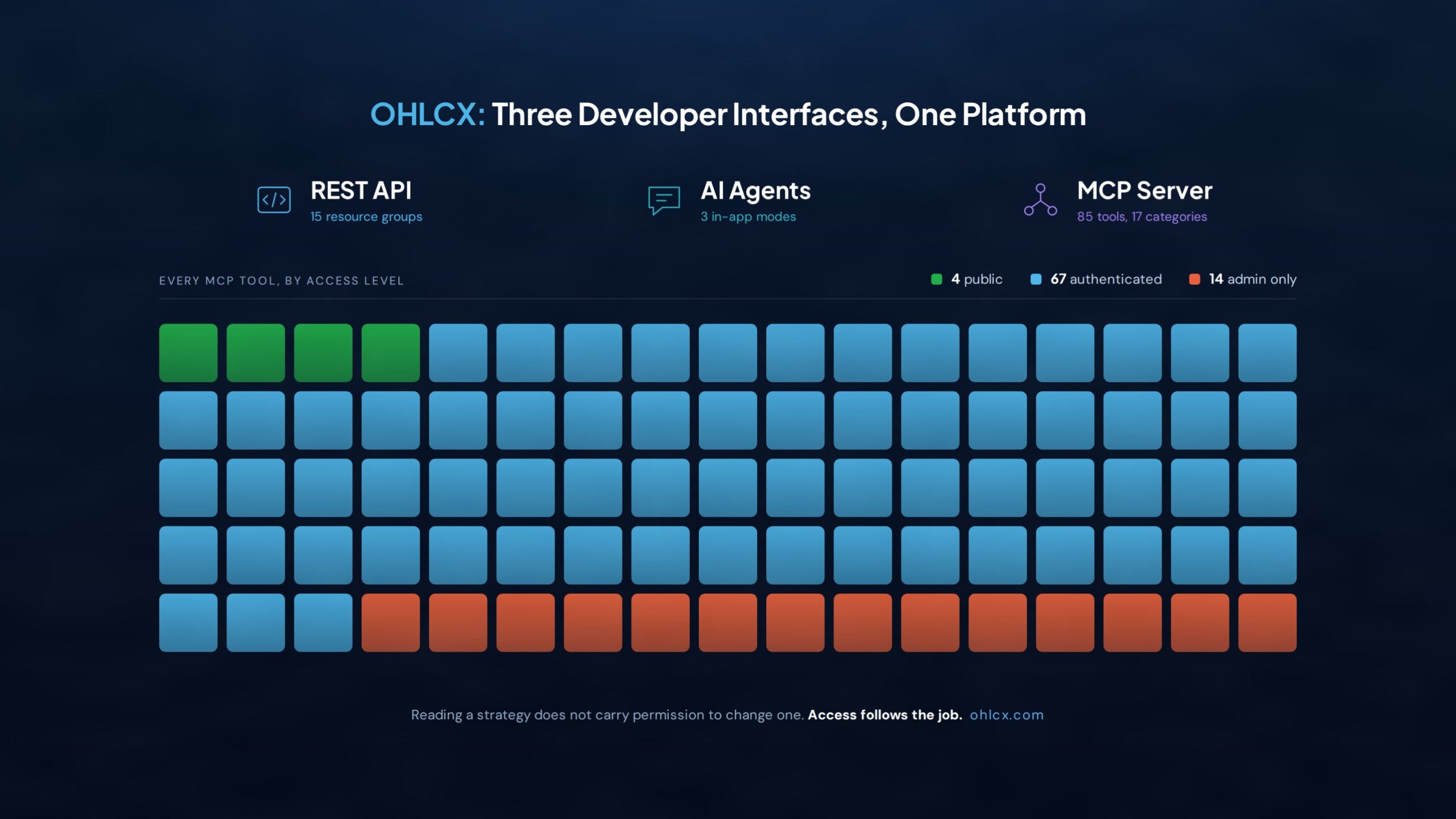
The OHLCX REST API exposes a JSON interface under /api/* across 15 resource groups. The documented resources span areas including strategies, signals, markets, accounts, AI agents, billing, and administration, and an OpenAPI 3.0 specification is available for teams working with the API.
That structure gives developers a way to integrate OHLCX capabilities without having to reproduce the OHLCX user interface.
A fintech company, for example, may already have its own front end and customer workflow. What it needs from OHLCX may be access to selected execution, strategy, or signal capabilities that can sit behind the product it has already built.
In that case, the API acts as infrastructure rather than another screen for the end user.
AI agents fit questions that start in plain English
Some interactions are harder to reduce to a single predefined request because the user starts with a question rather than a resource.
They may want help understanding a strategy, account context, a signal, or how part of the platform works. The person asking the question may not know which endpoint or dataset contains the relevant information.
The OHLCX AI Agents reference documents three in-app modes: Support, Trading, and Unified.
Support works from the OHLCX knowledge base without requiring account data. Trading is designed for authenticated, account-aware questions involving areas such as linked brokerage accounts, strategies, and signals. Unified combines those paths and adjusts the available context based on whether the user is authenticated and which platform access is available.
That creates a different interaction from a traditional API request. The user can begin with the question, while the agent works with the tools and context available to that mode.
For developers, that makes the agent layer useful when natural language is part of the product experience rather than something the application has to translate into its own conversational system first.
MCP fits assistants that need to use tools
Model Context Protocol becomes useful when the client is itself an AI assistant or development environment.
A developer working in Cursor, Claude, or another MCP-compatible client may want that assistant to inspect platform information or call supported functions directly. Building a separate proprietary integration around every individual capability would add another layer to maintain.
The OHLCX MCP Server currently exposes 85 tools across 17 categories and supports both HTTP and stdio transports.
Those tools cover areas including accounts, strategies, conditions, signals, markets, news, activities, billing, support, trading rooms, messaging, and administrative functions.
MCP gives compatible clients a defined catalog of tools they can discover and call. Each tool has a specific purpose rather than giving the assistant unrestricted access to the entire platform.
That distinction matters in a trading environment, where reading information and changing something should not automatically carry the same permissions.
More capability needs clearer permissions
The OHLCX MCP tool inventory shows that separation directly.
Of the 85 documented tools, 4 are public, 67 require authentication, and 14 are restricted to administrators. A support or knowledge-base workflow therefore does not receive the same access as an authenticated account workflow or an administrative function.
The same principle applies beyond MCP.
A developer integration should have access to what its job requires. A public support question does not need account data. Reading a strategy does not automatically require permission to change one. A workflow touching account or execution-related functions carries different requirements from a documentation lookup.
Those boundaries become more important as a developer platform grows, not less.
For OHLCX, the developer interfaces sit around the same broker-connected execution model used by the platform itself. Live brokerage workflows remain subject to the authorization and permissions required for the underlying account, with current broker connectivity operating through Schwab™.
One platform can support different kinds of builders
The reason to expose REST, AI agents, and MCP is not to give developers three versions of the same interface.
They support different ways of working.
A fintech application can use REST for structured product logic. A user-facing experience can use an agent when the interaction begins in natural language. An AI assistant or IDE can use MCP when it needs to discover and call supported platform tools.
Some integrations may eventually use more than one. An application could rely on the REST API for its core product workflow while using an AI agent for support or account-aware questions and MCP for internal developer tooling.
That flexibility matters for teams building around trading infrastructure because the interface should not dictate the product they have to build.
OHLCX was designed with an API-first architecture, and its developer layer gives builders several ways to work with execution, strategies, signals, account context, and other platform capabilities without treating the browser interface as the only entry point.
For fintech teams, technical partners, and enterprise developers, the practical starting point is simple: define the workflow first, then choose the interface that fits it.
Read the official announcement
OHLCX recently launched its documented developer platform across its REST API, AI agent interfaces, and MCP server.
The official OHLCX developer platform announcement includes the launch details, documented resource and tool counts, MCP transports, access model, and availability for partners and enterprise clients.
Teams evaluating an integration can explore the OHLCX Developer Hub, review the REST API reference, explore the AI Agents reference, or browse the MCP Server reference.
Developer and MCP access is available to partners and enterprise clients. Teams interested in API licensing, white-label deployment, or custom integrations can also review OHLCX partnership options.
Leave a Reply